Showing posts with label Tagging. Show all posts

Friday, November 03, 2006

Tag Clouds

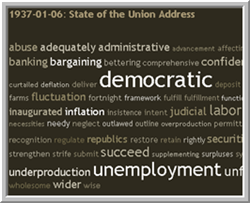
Tag CloudI have mentioned tagging before, but I haven't really discussed a "tag cloud".

Tagging allows users to give something a subject heading, whether it is a video, picture, book, whatever. On the sidebar, you will see a tag cloud of various articles that I have found on some topics, ranging from "trainingstaff" to "wikipedia". The larger the word, the more articles under that topic.

A tag cloud does not necessarily have to be associated with a tag (or subject heading). Sometimes a tag cloud can be created by the words in a speech or a book. For example, here is a site that produces a tag cloud of the 100 most used words in major Presidential speeches from John Adams to now. This quickly gives you an idea as to what was important to these Presidents at the time of their speech.

Also, a long time ago, I wrote about the Amazon Concordance tool that does the same thing with books. You can quickly decipher what a book is about and who the main characters are by simply looking at a group of words in various size.

The alternate to tag clouds is something like my Index on the sidebar. This lists the various subject headings with numbers next to them, the numbers being the amount of posts about a topic. This is fine for a small list, but a larger list would leave you scanning back and forth looking at various numbers and memorizing their priority.

Or, you could arrange your topics by the amount, but then you lose the alphabetical order that allows you to easily scan all topics.

The tag cloud allows you to quickly see all topics in alphabetical order while at the same time giving you an idea as to what topics are more important.

Monday, August 14, 2006

What is LibraryThing?

Someone recently asked me this question, "What is LibraryThing?"

LibraryThing is a web 2.0 tool that people can use to catalog their own books. You create a username, add your books, and give them tags.

The fun is only beginning, though. As I have mentioned before, the process of creating a username and tagging creates this social aspect that adds an additional layer of fun.

You can search for books, if you find a book you like, you can find the usernames of folks who own the book. You can follow that string to find out what other books these people own. People can add reviews to books. You can add your comments to their comments. You can even join a Group (click here to find out more about their groups).

Why don't you take a tour of LibraryThing and find out more.

Thursday, February 16, 2006

Internet: Folksonomy

The online world is quickly developing a complex sociology that affects the entire society. Here is a new term that has been floating around library circles nationwide due to that effect.

Folksonomy - a neologism, or recently coined word, for a practice of collaborative categorization using freely chosen keywords. This feature has begun appearing in a variety of social software, a broad term used to describe software-based tools that facilitate interaction and collaboration. At present, the best examples of online folksonomies are social bookmarking sites like del.icio.us, a bookmark sharing site, Flickr, for photo sharing, and 43 Things, for goal sharing.

Folksonomy is currently understood somewhat narrowly as "tagging". Social sciences and anthropology have long studied "folk classifications" - how average people (non-experts) classify the world around them. Folksonomies work best when a large number of users all describe the same piece of information.

A derivation of taxonomy, which is from "taxis" and "nomos" (from Greek). Taxis means classification. Nomos (or nomia) means management. Folk is people (from German). So folksonomy means people's classification management. (from wikipedia.org)

How will this affect our day-to-day operations? Will people become frustrated with the Library of Congress Subject Headings that we use or will this help them better understand the system?